
How to Share Consent Across Subdomains with Cross-Domain Consent
By default, each domain and subdomain that you add to Captain Compliance keeps its own consent record. A visitor who chooses on www.example.com is asked again on shop.example.com. Cross-domain consent links subdomains to their root domain, so that one choice can carry across them. This article explains the options, how to set them up, and what to consider first.
How it works
Linked domains share one consent cookie. It is set on the root domain, for example .example.com, where every subdomain can read it.
Only subdomains of the same root domain can be linked. Two different domains, such as example.com and example.org, cannot share consent this way, because browsers do not let one site read another site’s cookies.
Each domain keeps its own script, banner configurations, and cookie list.
The three options
Option | What happens |
|---|---|
Not linked (default) | Each domain asks on its own and stores its own choice. |
One-way from primary | The root domain is the primary. A choice made there is shared, so the visitor is not asked again on linked subdomains. A choice made on a subdomain is kept for that subdomain only. It does not change the choice on the primary or on other subdomains. |
Two-way within domain family | Any linked domain can update the shared choice. A choice made on one applies on all of them. |
Before you start
Add and scan each subdomain. Only scanned subdomains can be linked. See How to Scan Websites and Manage Domains.
Install each domain’s own script on that domain. See How to Publish a Consent Banner on Your Website.
Review the cookies found on each subdomain, and set up its banner.
Link subdomains
In the Captain Compliance app, select Scans in the sidebar.
On the root domain’s card, select the Cross-Domain icon, which looks like a paperclip.
Under Subdomains, select each subdomain that should share consent with the root domain.
Under Consent direction, select One-way from primary or Two-way within domain family.
Select Save changes.
The Cross-domain consent dialog:
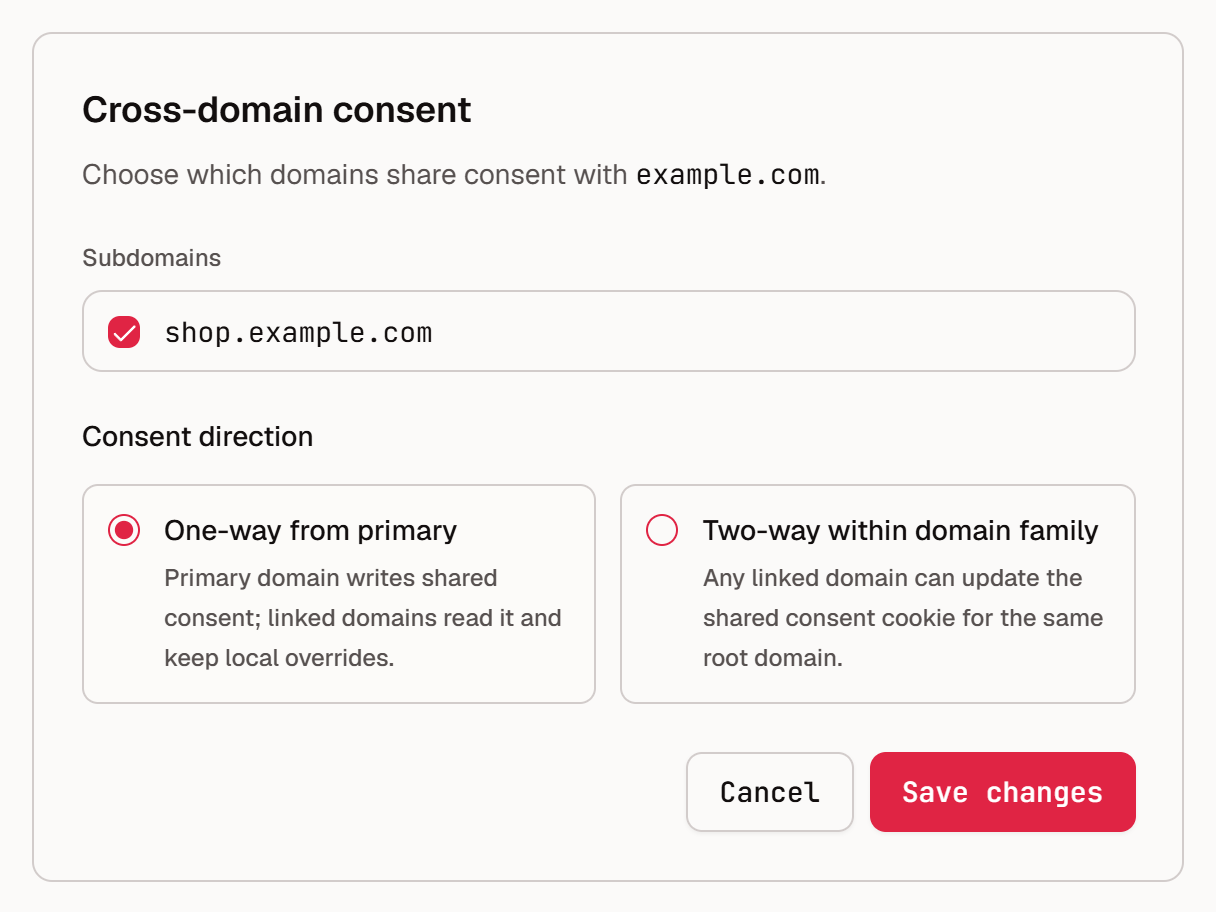
If the dialog says No domains to link, scan a subdomain of this domain first. To stop sharing, open the dialog again, clear the subdomain’s checkbox, and confirm. Allow about a minute for a change to reach the live banner.
What to consider
Sharing consent is a legal choice as well as a technical one.
Share only between sites that one organization runs for the same purposes. A visitor who allows analytics on a help site has not necessarily agreed to advertising cookies in a store.
Consent should be informed. If a subdomain uses vendors that the primary does not, a shared Allow may not cover them. Make sure that the banner text and the cookie transparency page describe the cookies used across all linked sites.
Opt-outs should travel at least as far as opt-ins. Under U.S. opt-out laws, a request to stop selling or sharing applies to the business, not to one web address. With one-way sharing, an opt-out made on a subdomain stays on that subdomain. Two-way sharing carries it to every linked site.
Use the same consent model for a region on every linked domain. Otherwise a choice made under one model is applied under another.
Tell visitors. Say in the banner or the privacy notice that the choice applies across your sites.
This article describes product behavior and common considerations. It is not legal advice. Confirm your approach with your own counsel.
Check the result
Open the root domain in a private or incognito browser window, and make a choice in the banner.
Open a linked subdomain in the same window. The banner should not appear again.
With two-way sharing, repeat the test in the other direction. With one-way sharing, confirm that a choice made on the subdomain does not change the root domain.
In the browser’s developer tools, look for the
cc_global_consentcookie. Its domain should be the root domain with a leading dot.
For more detail, add ?cc_debug=true to the page address. The console then shows how the banner resolved the shared choice. See How to Troubleshoot a Consent Banner That Does Not Appear or Respond.