
How to Deploy Multiple Consent Banners From a Single GTM Workspace
Captain Compliance consent banners are issued per domain. In some environments, a single Google Tag Manager (GTM) workspace is shared across multiple domains, each of which requires its own Captain Compliance banner and configuration.
This article explains how to deploy multiple Captain Compliance banner instances from the same GTM workspace, ensuring that the correct banner instance fires on the correct domain.
This setup is only required when:
One GTM container is used across multiple domains, and
Each domain requires its own Captain Compliance consent banner
If each domain has its own GTM container, this configuration is not necessary.
Step 1: Create a Separate Captain Compliance Tag Per Domain
For each domain that requires a consent banner:
Create a new Custom HTML tag in GTM
Paste the Captain Compliance script copied from the Captain Compliance app for that specific domain
Name the tag clearly to reflect the domain (for example, “Captain Compliance CMP – example.com”)
Only one Captain Compliance tag should exist per domain.
Step 2: Use the Consent Initialization Trigger
Each Captain Compliance tag should fire on Consent Initialization.
Firing on Consent Initialization ensures the banner loads at the earliest possible moment while still allowing consent state to be established before other tags execute.
Set the trigger type to Consent Initialization – All Pages
Restrict the trigger using domain-specific conditions (described below)
Step 3: Restrict Each Tag to Its Domain
To prevent multiple banners from loading on the same page, each Consent Initialization trigger must be scoped to a specific domain.
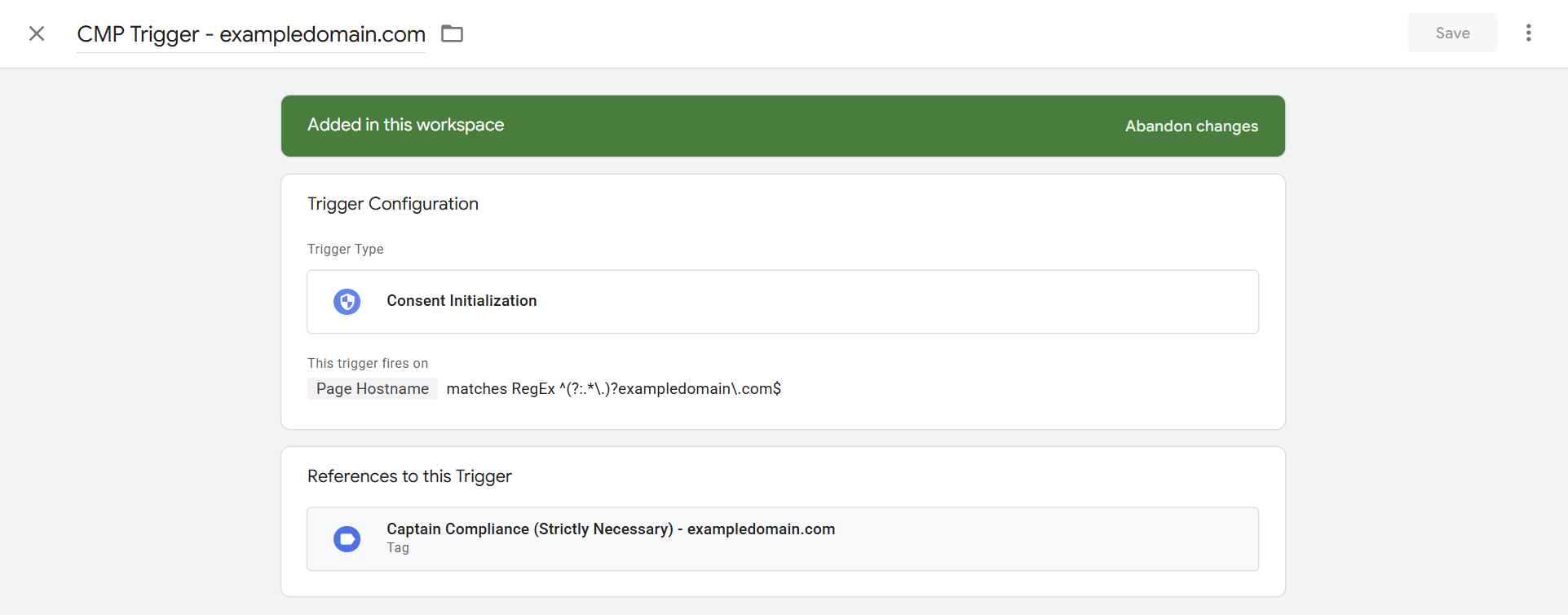
Recommended approach:
Use a trigger condition based on Page Hostname
Match the exact domain, including subdomains if applicable
Example trigger configuration:
Trigger type: Consent Initialization
Condition: Page Hostname matches RegEx
Example pattern:
^(?:.*\.)?exampledomain\.com$
Each Captain Compliance tag should reference only its corresponding domain trigger.